

Table of contents
- The Short Answer
- Why the Cloud Became the Wrong Default for Voice
- How Accurate Is On-Device Transcription in 2026?
- How Fast Is On-Device Transcription?
- How to Transcribe Offline on iPhone and iPad
- Long Recordings, Imported Files, and Everyday Use
- When a Cloud Service Is Still the Right Call
- Technical Details
- Frequently Asked Questions
Quick answer: Offline speech to text runs the AI model directly on your iPhone or iPad instead of a server. An on-device app like LoroNote turns meetings, lectures, and interviews into accurate text with no internet connection, no per-minute fees, and no audio ever leaving your device.
Most speech-to-text apps have a hidden dependency: a server. Your voice is captured on your phone, uploaded to a provider’s servers, transcribed there, and sent back to you. That round trip is why cloud transcription feels sluggish on weak Wi-Fi, why apps bill by the minute, and why their privacy policies need a paragraph explaining how long they keep your audio.
Offline speech to text removes the server entirely. The AI model runs on the chip already in your pocket. This guide explains how that works in 2026, where it beats cloud services (and where it doesn’t), and how to set it up on your iPhone or iPad in a couple of minutes.
The Short Answer
| If you need… | Best option |
|---|---|
| Private, unlimited transcription of meetings, lectures, and interviews on iPhone or iPad | An on-device app like LoroNote |
| To dictate a quick text message | The built-in iOS keyboard dictation — see what the built-in tools can do |
| Live shared notes for a whole team during a call | A cloud collaboration service |
| Batch-processing hundreds of audio files | Open-source Whisper on a desktop computer |
The rest of this guide focuses on the first case: long-form recordings turned into text entirely on your device. If you want to compare the apps that can do this before reading the theory, we keep a separate roundup of the 5 best offline speech to text apps for iPhone and iPad.
Why the Cloud Became the Wrong Default for Voice
1. Your audio takes a round trip it doesn’t need
A cloud transcription app can’t do anything until your recording finishes uploading. On a fast connection you barely notice; on conference Wi-Fi, in a lecture hall basement, or on a plane, you wait — or the app simply fails. On-device transcription has no upload step. If your phone is on, it works: airplane mode, subway, mountain cabin, anywhere.
2. The subscription math
Cloud providers pay for GPU servers every time you transcribe, so they meter you. Typical cloud transcription plans run somewhere between $8 and $20 per month, usually with a monthly cap on minutes. On-device transcription uses hardware you already own — the Neural Engine in your iPhone — so there is no per-minute cost to pass on. That is also why LoroNote can offer something no server-dependent service can afford: a one-time lifetime purchase.
| Typical cloud service | LoroNote (on-device) | |
|---|---|---|
| Price | ~$8–20 / month | $4.99/mo, $19.99/yr, or $39.99 once |
| Monthly minute cap | Common | None — unlimited |
| Works offline | No | Yes, 100% |
| Where audio is processed | Provider’s servers | Your device only |
The gap compounds. Because the cloud service keeps paying for servers, you keep paying too — while a one-time purchase is done the day you buy it:
| Year 1 | Year 3 | Year 5 | |
|---|---|---|---|
| Typical cloud plan | $96–240 | $288–720 | $480–1,200 |
| LoroNote lifetime | $39.99 | $39.99 | $39.99 |
3. Privacy is architecture, not policy
When your audio is uploaded, its safety depends on promises: retention policies, employee access rules, breach response plans. Those can change, and they can fail. When audio never leaves your device, there is nothing to promise. A recording that was never uploaded cannot be leaked, subpoenaed from a third party, or quietly used as training data. And a voice recording is worth protecting more than most data: your voice is a biometric identifier — a leaked password can be rotated, but your voice cannot. For anyone recording client calls, medical consultations, therapy sessions, or internal meetings, this is the difference that matters.
How Accurate Is On-Device Transcription in 2026?
A few years ago, going offline meant accepting worse results. That trade-off is gone. LoroNote runs OpenAI’s Whisper Large V3 Turbo — a state-of-the-art open model — directly on your iPhone or iPad, reaching up to 98% accuracy on clear speech and supporting more than 100 languages, all offline. (If you want the full reasoning behind that model choice, we wrote it up in why LoroNote uses Whisper Large V3 Turbo.)
Honest caveats, because no engine is magic:
- Audio quality still rules. A phone lying in the middle of a quiet room beats a phone in a pocket at a noisy café, for any transcription engine.
- Simultaneous overlap is still hard. LoroNote separates speakers automatically, but when several people talk at exactly the same time, expect to clean up a few lines afterward.
- Punctuation is automatic. Whisper inserts punctuation itself — don’t dictate “comma” and “period” like you might with older dictation tools. And if you’d rather have punctuation-free text, LoroNote can remove it automatically too.
How Fast Is On-Device Transcription?
Faster than most people expect, because there is no upload step. On an iPhone 15 Pro, LoroNote transcribes at roughly 19× real time — a one-hour meeting becomes text in about 3 minutes, and a 10-minute voice note in well under a minute. By the time a cloud app has finished uploading a long recording over hotel Wi-Fi, the on-device transcript is often already done.
Two honest qualifiers. Older chips are slower — the work scales with your hardware, and an iPhone from several years ago will take noticeably longer than a current Pro model. And the work is real: transcribing a multi-hour recording uses battery, so plug in for the big jobs. What you never pay is network time, per-minute fees, or a queue on someone else’s server.
How to Transcribe Offline on iPhone and iPad
- Install LoroNote from the App Store — it runs on both iPhone and iPad.
- Record, or import. Tap record for a live conversation, lecture, or voice note — or import an existing audio file to transcribe something you recorded elsewhere.
- Let it transcribe on-device. The Whisper model runs locally. No upload bar, no “processing on our servers” spinner, and it works in airplane mode.
- Edit with timestamps. Every line is linked to its moment in the recording and labeled by speaker, so you can tap a sentence, hear the original audio, and fix anything that needs it.
- Organize and share. Sort notes into folders, find past recordings in the calendar view, and share the finished text wherever it needs to go. Your notes sync between your devices through your private, encrypted iCloud storage.
That’s the entire workflow. There is no account creation and no audio ever sent to us — we couldn’t read your notes if we wanted to.
Who said what — automatic speaker detection
Record a meeting or import an interview, and LoroNote labels every segment by speaker — no setup, and like everything else, fully on-device:
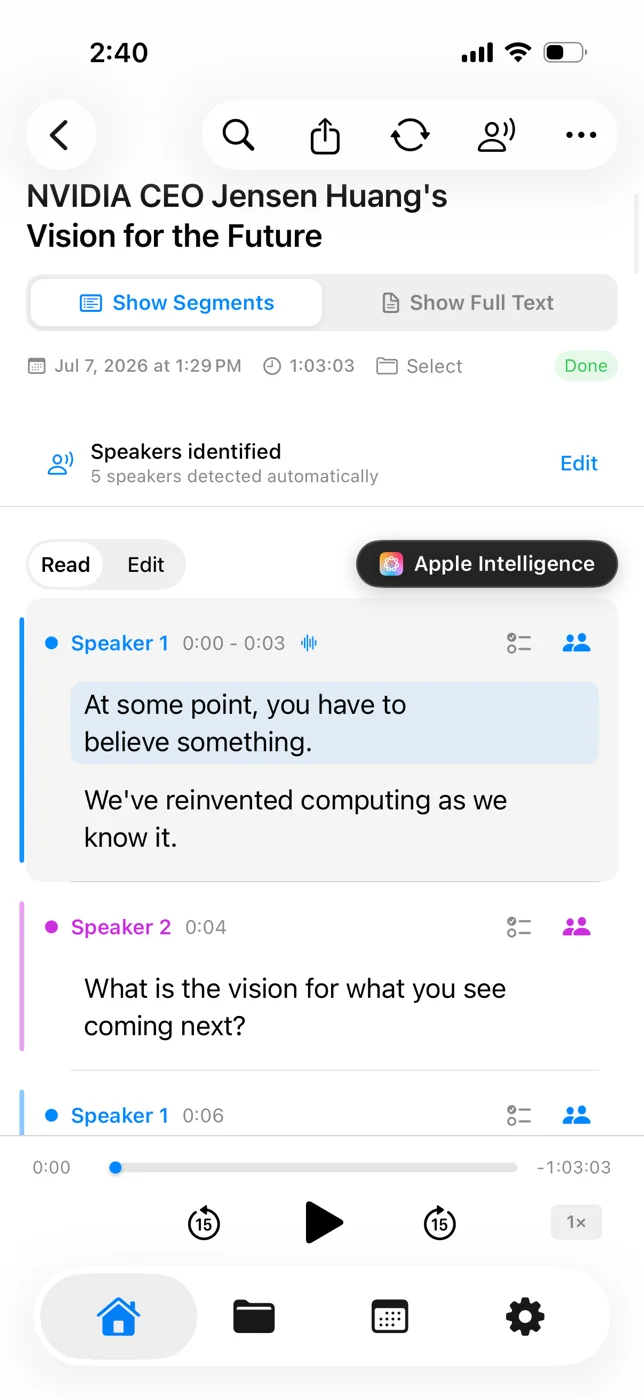
Each segment carries its speaker and timestamp, and tapping it jumps to that moment in the audio — so finding who said what in an hour-long session takes seconds, not a replay. (Separating voices without a cloud server is genuinely hard; how speaker diarization works explains what is going on under the hood.)
Long Recordings, Imported Files, and Everyday Use
LoroNote has no hard limit on recording length or on how much you transcribe — a 5-second reminder and a 3-hour seminar are both fair game. Two practical notes for very long sessions: transcription time scales with audio length, and long recordings need reasonable free storage and battery, since your device is doing all the work.
Because you can import audio files, LoroNote also works as an offline transcription engine for recordings that didn’t start on your phone: interviews from a dedicated recorder, voice memos, or audio shared by a colleague.
When a Cloud Service Is Still the Right Call
- Real-time team collaboration. If ten people need to watch and edit a shared live transcript during a call, that coordination genuinely needs a server.
- Organization-wide meeting archives. Automatically distributing meeting notes across a whole company calls for a cloud workflow, not a private notes app.
- Deep workflow automations. If you want transcripts piped automatically into a CRM, cloud tools integrate more directly.
If your recordings are for you — your meetings, lectures, interviews, and ideas — none of those trade-offs apply. For personal recordings, on-device processing wins on the criteria that matter most: speed, cost, and privacy.
Technical Details
- Platforms: iPhone and iPad
- Engine: OpenAI Whisper Large V3 Turbo, running fully on-device
- Speaker diarization: automatic speaker separation for meetings and interviews — processed on-device like everything else
- Languages: 100+, all offline, including English, Korean, Japanese, Chinese, Spanish, French, and German
- Storage: recordings and transcripts stay on your device and in your private, encrypted iCloud
- Limits: none — unlimited recording length and transcription volume
- Price: $4.99/month, $19.99/year, or a one-time $39.99 lifetime purchase (see pricing)
- Speed: about 19× real time on an iPhone 15 Pro — a one-hour recording becomes text in roughly 3 minutes
Frequently Asked Questions
Does offline transcription need an internet connection at all?
Recording and transcription are 100% offline. The only thing that touches a network is optional iCloud sync between your own devices, which happens whenever you’re back online.
How accurate is it?
Up to 98% on clear speech with Whisper Large V3 Turbo. Accuracy depends on audio quality, speaking clarity, and language — a quiet room and a nearby microphone give the best results.
Is there a limit on recording length?
No hard limit. Very long recordings just take longer to transcribe and need sufficient battery and storage.
Which languages are supported?
More than 100, all offline and all with the same engine — no separate downloads per conversation.
Can it tell who said what?
Yes. LoroNote separates speakers automatically, so multi-person meetings and interviews come out labeled by speaker — and like the transcription itself, diarization runs entirely on your device.
Where do my recordings actually live?
On your device, and in your private iCloud (encrypted, accessible only to you) if you use sync. They are never sent to our servers — we don’t have servers that handle your audio.
What does it cost?
$4.99 per month, $19.99 per year, or $39.99 once for lifetime access. All plans include unlimited transcription and every feature — and with the lifetime option, you never pay again.
Does LoroNote work on Android, Windows, or Mac?
No. LoroNote is built for iPhone, iPad, and Apple Watch. If you need transcription on a desktop computer, open-source Whisper can run there; on Android there is currently no LoroNote app.
Does OpenAI Whisper work offline?
Yes — Whisper is an open model, and running it locally is exactly what it was released for. On a desktop you can run it yourself with open-source tools if you are comfortable with a command line. On iPhone and iPad, apps like LoroNote package the same model family so it runs on-device with no setup: no Python, no terminal, no model files to manage.
Is there a free way to transcribe speech offline?
On a recent iPhone, Apple’s Voice Memos transcribes in ten supported languages at no cost, and it is the right place to start. You will hit its limits when you need other languages, speaker labels, subtitle export, or transcription of files you recorded elsewhere — that is when a dedicated offline app earns its price. Our roundup of the best offline apps compares the free and paid options honestly.
Ready to try it? Download LoroNote on the App Store and turn your first recording into text in the next five minutes — no signal required.
Turn your voice into text — offline
LoroNote transcribes meetings, lectures, and interviews right on your iPhone — private, accurate, and unlimited.
Download on the App Store