

Table of contents
- The quick answer: what good AI meeting minutes include
- How to create AI meeting minutes in six steps
- Copy-ready AI meeting minutes template
- Five mistakes to avoid with AI meeting notes
- Bot, desktop app, or recorder: three ways AI captures a meeting
- How to choose an AI meeting minutes tool
- Frequently asked questions
- Conclusion
- Official resources
The goal of AI meeting minutes is not to capture every word. It is to leave the meeting with a reliable record of what was decided, who owns each task, when it is due, and what still needs an answer.
AI can remove hours of typing by turning audio into text and drafting a summary. It can also mishear names, numbers, negatives, owners, and deadlines. The most dependable workflow is therefore simple: let AI prepare the first draft, then have a person verify the details against the recording.
This guide covers the full process—from preparing and recording a meeting to labeling speakers, extracting decisions, reviewing action items, and sharing the result. A copy-ready meeting minutes template is included below.
The quick answer: what good AI meeting minutes include
Useful minutes are shorter than a transcript but more specific about what happens next.
| Required section | Question it should answer |
|---|---|
| Meeting details | When, why, and with whom did the meeting happen? |
| Three-line recap | Can someone who missed the meeting understand the result? |
| Decisions | What was actually approved? |
| Action items | Is every task paired with an owner and due date? |
| Open questions | What remains unresolved, and when will it be revisited? |
| Source | Can an important statement be checked in the original audio? |
Use this six-step flow:
- Define the meeting objective and output format.
- Tell participants why you are recording and who will receive it.
- Record from a position where every speaker is clear.
- Transcribe the audio and replace generic speaker labels.
- Verify decisions, owners, and deadlines against the recording.
- Share only the information the audience needs.
How to create AI meeting minutes in six steps
1. Decide what the minutes must deliver
Before recording, answer one question: “What should readers be able to do after reading these minutes?” Choosing the structure in advance prevents you from searching through a long transcript later.
Write these four lines before the meeting starts:
- Objective: What must be decided today?
- Required participants: Are the decision maker and task owners present?
- Expected output: Is this meeting for a decision, ideas, or a status update?
- Audience: Will the minutes stay with attendees or go to another team?
For a weekly status meeting, use last week’s result → blockers → this week’s tasks. For a decision meeting, capture selected option → rationale → objections → conditions for review.
2. Check recording quality and consent
Transcription quality starts with the recording. Place the device near the main speakers without letting desk vibrations, fans, or background music dominate the audio. For an important long meeting, record ten seconds and play it back before continuing.
Use this pre-meeting checklist:
- Check battery level and available storage.
- Prevent calls or notifications from interrupting the recording.
- Place the iPhone or iPad where everyone can be heard.
- Ask participants to avoid speaking over one another.
- Add names, product terms, and acronyms to the custom dictionary.
- Explain the purpose, retention period, and sharing scope of the recording.
Recording laws and workplace policies vary by location, relationship, and purpose. Inform participants clearly, obtain consent where appropriate, and follow your organization’s security and retention rules.
3. Record the meeting or import an existing file
Record a new meeting in the app, or import one previously saved by Voice Memos, a camera, or another meeting tool. LoroNote accepts audio such as MP3, WAV, and M4A, as well as MP4 and MOV video.
Apple Voice Memos can also display and copy transcripts on supported devices and in supported languages. It is a convenient option for a short personal recording. A dedicated transcription app is more useful when you need imported files, several speakers, SRT subtitles, or a searchable archive. See the offline speech-to-text guide for a broader comparison of local and cloud workflows.
4. Label speakers before summarizing
Do not summarize a transcript while it still says Speaker 1 and Speaker 2. Replace those labels with participant names or roles first. Correct attribution helps prevent a proposal from being mistaken for the decision maker’s approval—or one person’s task from being assigned to someone else.
LoroNote can detect speakers automatically or use a known count from two to eight. After processing, you can rename speakers, correct individual segments, and merge labels that belong to the same person.
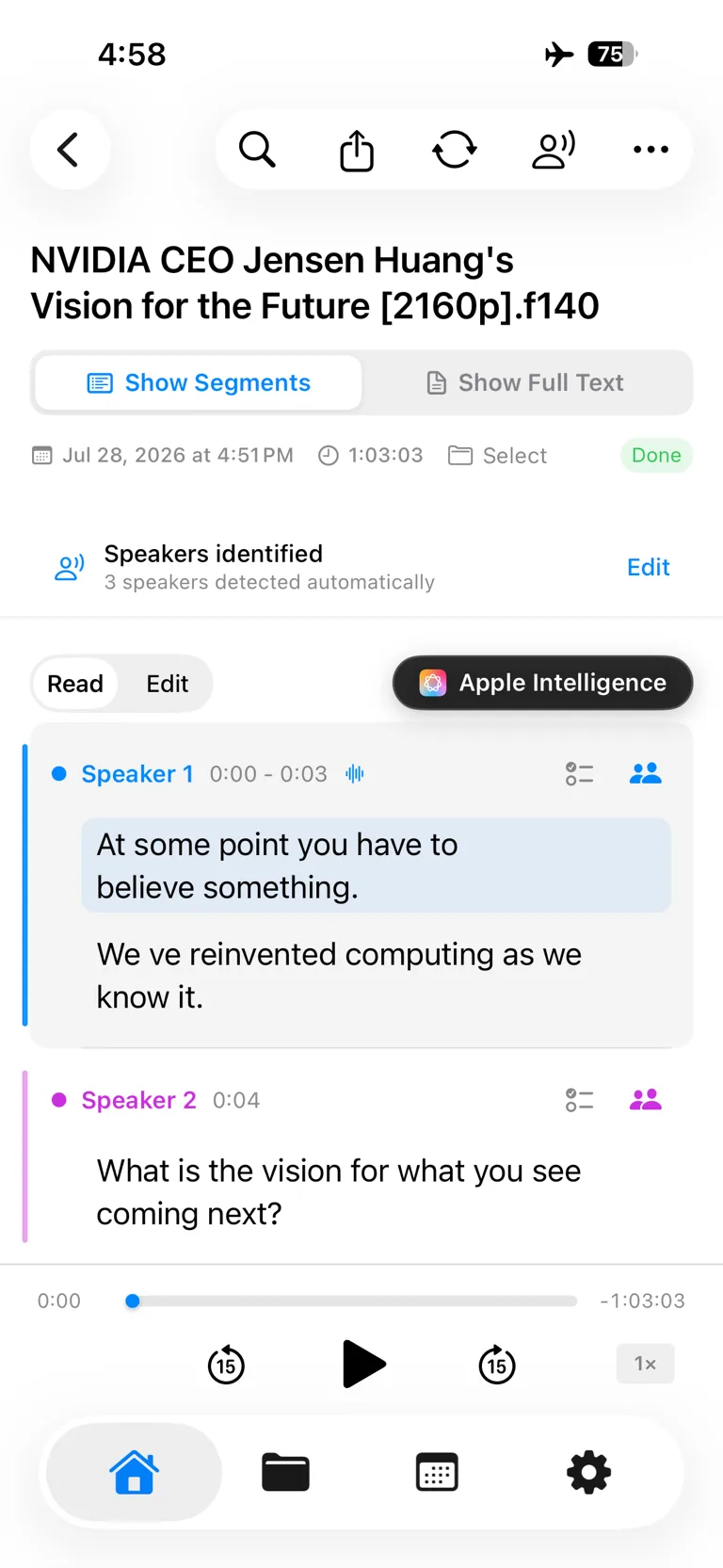
Replace generic labels with participant names before assigning decisions and action items.
Prioritize these details during review:
- People, company, and product names
- Amounts, quantities, dates, and version numbers
- Negatives such as “will” versus “will not”
- Sentences that assign an owner
- Conditions and exceptions attached to a final decision
The iPhone speaker diarization guide explains how to inspect and correct multi-speaker transcripts.
5. Separate decisions from action items
Move through the transcript in this order:
- Find decision language: “Let’s proceed with this option.”
- Find commitment language: “I’ll send it by Friday.”
- Find deferred language: “We’ll decide after reviewing the data.”
- Check whether every task includes an owner and date.
- Mark missing details as
owner TBDordue date neededinstead of guessing.
Suppose the transcript says:
Mina: I’ll fix the login issue and upload a test build by Wednesday afternoon. Jason, please prepare the customer notice. We’ll decide on the release Thursday after reviewing the test result.
Convert it into a structure that is easy to act on:
| Type | Detail |
|---|---|
| Action item | Fix login issue and upload test build |
| Owner | Mina |
| Due | Wednesday afternoon |
| Follow-up | Prepare customer notice — Jason |
| Open decision | Release approval — Thursday, after test results are reviewed |
On supported Apple devices, OS versions, languages, and settings, Apple Intelligence can help draft summaries and action items. Treat generated output as a draft and compare important details with the original recording.
6. Run a three-minute review and share selectively
Before sharing, check the minutes in this order:
- Numbers: Do amounts, dates, and quantities match the audio?
- Decisions: Has a suggestion been mistaken for an approval?
- People: Is each task assigned to the right person?
- Deadlines: Did the AI invent a date that was never stated?
- Scope: Does the document contain private information the audience does not need?
You usually do not need to distribute the full transcript. Share the recap, decisions, and action items, then restrict access to the source audio and transcript based on your retention policy.
Copy-ready AI meeting minutes template
Paste this template into Notes, Notion, Slack, or your team documentation tool.
# [Meeting name]

- Date and time:
- Participants:
- Note owner:
- Objective:

## Three-line recap

1.
2.
3.

## Decisions

- [Decision] — Rationale:

## Action items

| Task | Owner | Due date | Status |
| --- | --- | --- | --- |
|  |  |  | Planned |

## Open questions

- [Question] — Owner: / Review date:

## Next meeting

- Date:
- Decision needed next time:
Adapt one section to the meeting type
| Meeting type | Add this section |
|---|---|
| Weekly status | Last week / blockers / this week’s priorities |
| Decision meeting | Options / rationale / objections / review trigger |
| Customer interview | Customer’s exact words / context / current workaround |
| Hiring interview | Evidence by criterion / follow-up questions |
| One-on-one | Support needed / agreed next actions |
Five mistakes to avoid with AI meeting notes
1. Treating the transcript as the minutes
A transcript is a searchable source. Meeting minutes are a decision and execution document. Sharing raw text forces every reader to analyze the meeting again.
2. Trusting the summary without checking the recording
Names, numbers, negatives, and technical terms can be wrong. Always replay statements involving contracts, money, schedules, or responsibility.
3. Guessing an owner or deadline
If someone says “Let’s check next week,” do not invent a person or date. Mark the field as unresolved and confirm it immediately after the meeting.
4. Leaving generic speaker labels
If nobody knows who Speaker 1 is, nobody can trust the assigned action item. Clean up speaker labels before creating the summary.
5. Uploading every sensitive meeting by default
Recordings may include customer data, internal plans, or personnel information. Check where audio is processed, how long it is retained, and whether it is used for model training. LoroNote processes recording and transcription on the device and can work offline. Optional sync uses your private iCloud. Learn what to evaluate in the offline transcription guide.
Bot, desktop app, or recorder: three ways AI captures a meeting
Every AI meeting minutes tool starts by getting the audio somehow, and the three approaches behave very differently:
- A meeting bot joins your Zoom, Meet, or Teams call as a visible participant (Otter is the best-known example). It automates capture completely for online meetings — and does nothing for the meeting that happens across a table, and puts a bot in every attendee list.
- A desktop app captures system audio on your computer during calls, with no bot in the room. It stays invisible to other participants but is tied to the machine running it, and still cloud-processes the audio in most products.
- A recorder-based app records through a microphone — a phone on the table or an Apple Watch — and transcribes afterward. It is the only approach that treats in-person meetings as a first-class case, and with on-device transcription it is also the only one where the audio can stay entirely on your hardware.
None of these is universally right. If all your meetings are scheduled video calls and your team lives in a shared workspace, the bot model earns its subscription. If your important conversations happen in rooms — client visits, interviews, one-on-ones, site walkthroughs — the recorder model is the one that actually captures them, and it doubles as the private option for the calls you would rather not route through a vendor.
How to choose an AI meeting minutes tool
Compare tools against your actual workflow:
- Can it import existing audio and video?
- Does it support the languages you use?
- Can you identify, rename, and correct speakers?
- Can you replay the exact audio while checking text?
- Can you export in the formats you need, such as TXT or SRT?
- Where are recordings and transcripts processed and stored?
- Are transcription minutes capped after the trial?
- Do you need a bot to join Zoom, Meet, or Teams automatically?
LoroNote is designed for individuals who want to record, transcribe, and organize meetings privately on an iPhone or iPad. If automatic meeting attendance, collaborative web editing, or organization-wide permissions matter more, a cloud meeting platform may be a better fit. The LoroNote vs Otter.ai comparison explains that trade-off.
Frequently asked questions
Are AI meeting minutes complete as soon as the meeting ends?
AI can prepare a transcript and summary quickly, but do not publish the draft without review. Verify speakers, numbers, dates, decisions, and owners against the source audio.
Can AI handle a meeting with several speakers?
Yes. Speaker diarization divides a conversation by voice. Overlapping speech and distant microphones can still cause errors. LoroNote supports automatic detection or a known count from two to eight, followed by manual label correction.
Can I record and transcribe a meeting without internet access?
Yes, with an on-device transcription app. LoroNote records and transcribes on a supported iPhone or iPad. App Store purchase checks, iCloud sync, and external sharing may still require a connection.
Do I need Apple Intelligence?
No. Recording, transcription, speaker review, and template-based minutes work without it. Supported Apple Intelligence environments can assist with summary and action-item drafts; availability varies by device, OS, language, and settings.
Do I need a meeting bot to get AI meeting minutes?
No. A bot only automates capture for online meetings. Recording with a phone or watch and transcribing afterward produces the same speaker-labeled transcript for any meeting — including in-person ones a bot can never attend — and with an on-device app the audio never leaves your hardware. What a bot buys you is convenience for back-to-back video calls; what it costs you is a visible participant in every meeting and cloud processing of everything it hears.
Can AI create minutes for an in-person meeting?
Yes, and this is where recorder-based tools have the advantage. Place the phone where every participant is audible, record, then transcribe with speaker diarization and work through the six steps above. The bot-based services are built around video calls; a physical meeting room is exactly the case they skip.
How long can a meeting recording be?
Practical limits depend on storage, battery, temperature, audio quality, and processing time. Check available storage and power before a long meeting, then test the workflow with a short sample.
Should I share the complete recording with the team?
Usually not. Share the recap, decisions, and action items first. Give access to the full audio only to people who need it, in line with your organization’s security and retention policy.
Conclusion
The most effective AI meeting minutes workflow is accurate transcription → speaker review → decision and task extraction → source verification → selective sharing. Let AI handle repetitive transcription and formatting while a person confirms what was decided and who is responsible.
Before your next meeting, paste the template into your notes and fill in the objective and participants. Afterward, a quick check of names, numbers, owners, and deadlines will turn a passive record into minutes your team can act on.
Official resources
Turn your voice into text — offline
LoroNote transcribes meetings, lectures, and interviews right on your iPhone — private, accurate, and unlimited.
Download on the App Store