

LoroNote vs Otter.ai (2026): Pricing, Privacy, and the Offline Alternative
Updated: LoroNote Team13 min
Table of contents
- LoroNote vs Otter.ai at a glance
- Why people go looking for an Otter.ai alternative
- Pricing: LoroNote is far less expensive once you pay
- The core difference: private recorder or meeting agent
- Languages: both handle English, LoroNote covers more
- Transcription minutes and file limits
- Otter is stronger for live meetings and teamwork
- AI summaries and external AI tools
- Privacy and offline use
- Where Otter.ai is better
- Where LoroNote is better
- Which one should you choose?
- Switching from Otter.ai: what moves with you
- Frequently asked questions
- Final verdict
- Official sources
- Footnotes
Otter.ai is a cloud-based AI meeting agent that can join Zoom, Google Meet, and Microsoft Teams calls, transcribe them live, and share the notes with a team. LoroNote is an on-device transcription app that processes audio directly on an iPhone or iPad.
The 30-second answer: Choose Otter.ai when you want a bot to attend online meetings and your team needs to edit the same notes. Choose LoroNote when you want private offline transcription, no usage caps, and a substantially lower long-term price.
On price alone, LoroNote costs $19.99 per year or $39.99 for lifetime access. Otter Pro costs $99.99 per year. Otter Basic can still be the cheapest option, however, if 300 minutes a month and 30 minutes per conversation are enough—it is free.
Methodology and disclosure: This comparison was written by the LoroNote team. We have included the situations where Otter.ai is the better choice. Features and prices were checked on August 6, 2026 against official product pages, help centers, and US App Store listings. Prices, taxes, promotions, and plan limits can change.
LoroNote vs Otter.ai at a glance
| Category | LoroNote | Otter.ai |
|---|---|---|
| Best for | Personal recordings, lectures, interviews, files | Automated online meeting notes and team collaboration |
| Where audio is handled | On your iPhone or iPad | In Otter’s cloud |
| Internet required | No, not for recording or transcription | Yes, for meeting capture, uploads, and transcription |
| English transcription | Supported | Supported |
| Languages | 100+ | English, Spanish, French, German, Japanese, Simplified Chinese |
| Transcription style | Record or import, then transcribe on-device | Live transcription, meeting bot, and file import |
| Speaker recognition | Automatic and on-device | Speaker identification and shared speaker profiles |
| Free use | Free download with in-app purchase | Basic: 300 min/month, 30 min/conversation, 3 lifetime imports |
| Individual pricing | $4.99 monthly, $19.99 yearly, or $39.99 lifetime | Pro: $16.99 monthly or $99.99 yearly |
| Paid usage allowance | No plan cap on length or quantity1 | Pro: 1,200 min/month, 90 min/conversation, 10 imports/month |
| AI tools | Apple Intelligence summaries on supported devices | Summaries, action items, Otter AI Chat, and AI workflows |
| Meeting auto-join | No | Zoom, Google Meet, and Microsoft Teams |
| Collaboration | TXT/SRT export and personal iCloud sync | Links, channels, collaborative editing, comments, assignments |
| Platforms | iPhone, iPad, Apple Watch | Web, Mac, Windows, iPhone, iPad, Android |
| Account | No separate LoroNote account | Otter account required |
Why people go looking for an Otter.ai alternative
Search data is blunt about this: far more people look for an “Otter.ai alternative” than for any specific competitor. The reasons that come up are all documented in Otter’s own materials, and they are worth naming before the detailed comparison:
- The minute meter. Basic caps you at 300 minutes a month and 30 minutes per conversation; even Pro meters you at 1,200 minutes a month and 90 per conversation. If you record long interviews or lectures, you are always doing arithmetic.
- The price. Otter Pro is $99.99 a year, every year. For a single user who mainly transcribes their own recordings, that is a lot of subscription for features built around teams.
- Cloud-only processing. Every recording and upload is processed on Otter’s servers. There is no offline mode and no on-device option — a dealbreaker for confidential material, and for anywhere without a connection.
- The visible bot. Otter Notetaker joins meetings as a participant. That is the feature working as designed, but it also means every meeting starts with a bot in the attendee list — and in some jurisdictions, recording requires every participant’s consent, which the bot makes a standing conversation topic.
- Six languages. Otter officially transcribes English, Spanish, French, German, Japanese, and Simplified Chinese. Work outside that list and it is simply not an option.
If none of those bite — your meetings are online, in English, under 90 minutes, and your team lives in the shared workspace — Otter is genuinely good at its job, and the rest of this comparison says so where it is true. If one of them is the reason you are here, the comparison below is organized around exactly those points.
Pricing: LoroNote is far less expensive once you pay
The products use different pricing models. Every paid LoroNote option includes the same features and unlimited transcription; you only choose how long you want access. Otter divides features and allowances among Basic, Pro, Business, and custom-priced Enterprise plans.
Official web and US App Store prices
| Plan | Monthly billing | Annual total | Main allowance or condition |
|---|---|---|---|
| LoroNote Monthly | $4.99 | $59.88 | No plan cap on transcription |
| LoroNote Yearly | About $1.67/month | $19.99 | Same features, auto-renewing subscription |
| LoroNote Lifetime | $39.99 one time | No renewal | Keep using the same features |
| Otter Basic | Free | Free | 300 min/month, 30 min/conversation, 3 lifetime imports |
| Otter Pro | $16.99 | $99.99 | 1,200 min/month, 90 min/conversation, 10 imports/month |
| Otter Business2 | $30/user | $239.99/user | Unlimited meetings, 4 hours/conversation, team administration |
| Otter Enterprise | Custom quote | Custom quote | SSO, SCIM, advanced controls, API/webhooks, HIPAA add-on |
For one year of paid individual use, LoroNote Yearly is $80 less—about 80% cheaper—than Otter Pro Yearly. LoroNote’s $39.99 lifetime purchase costs about 40% of a single $99.99 year of Otter Pro.
What about regional App Store prices?
Apple converts prices into local currencies and may show current, legacy, or promotional products side by side. Compare the product website with the final App Store purchase screen before paying. The confirmation screen—not a price quoted in an article—is the amount Apple will charge in your storefront.
The gap grows over time
Assuming today’s prices stay unchanged and you choose the lowest-cost paid LoroNote option for each period:3
| Time used | Lowest LoroNote cost | Otter Pro paid yearly | Difference |
|---|---|---|---|
| 1 year | $19.99 (Yearly) | $99.99 | $80.00 |
| 3 years | $39.99 (Lifetime) | $299.97 | $259.98 |
| 5 years | $39.99 (Lifetime) | $499.95 | $459.96 |
Otter is not always the expensive option. If you stay under 300 minutes a month, keep each conversation below 30 minutes, and only need three imported files, Otter Basic remains free. The limits become noticeable when you record longer interviews or need access to more than the 25 most recent conversations.
The core difference: private recorder or meeting agent
The price gap makes more sense once you look at what each product is built to do.
LoroNote: audio → Whisper on your iPhone or iPad → transcript → your device and personal iCloud
Otter.ai: online meeting or upload → Otter cloud → live transcript and summary → shared team workspace
LoroNote is a personal tool for recording or importing audio and video. It does not send the recording to a transcription server, and it works in Airplane Mode.
Otter can connect to your calendar and send Notetaker to scheduled Zoom, Google Meet, and Microsoft Teams calls. It produces live captions, creates a summary and action items, and lets a team review the same record through channels and shared links.
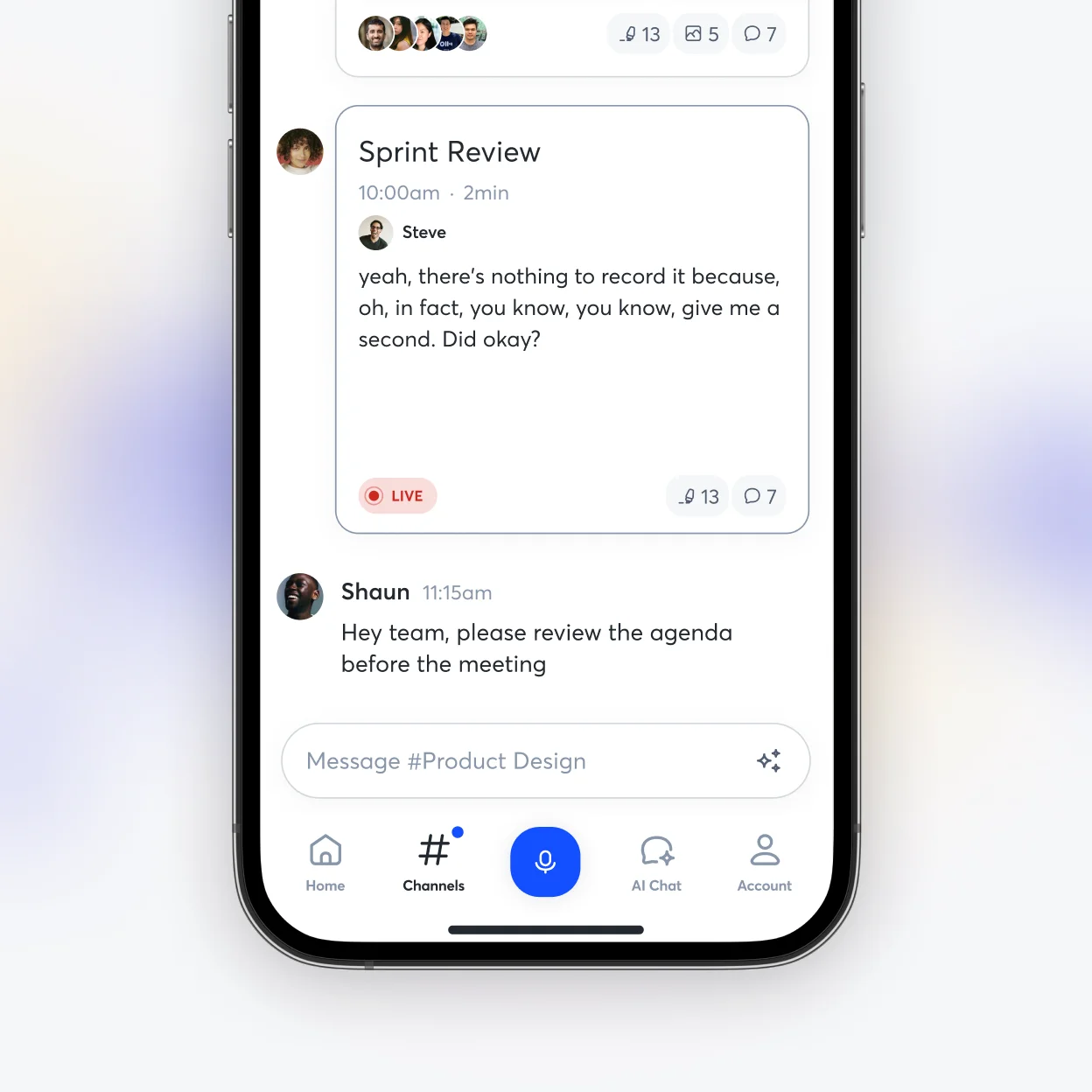
Otter.ai’s mobile live-transcription and channel interface. Image: Otter.ai
If you mainly need to turn your own recordings into text, LoroNote’s lower price and local processing are direct benefits. If you need to automate attendance, capture, sharing, and follow-up for online meetings, Otter’s subscription may pay for itself in saved team time.
Languages: both handle English, LoroNote covers more
Otter officially transcribes English, Spanish, French, German, Japanese, and Simplified Chinese. You select one language for each conversation, with automatic switching between French and English as a limited exception.
LoroNote uses Whisper Large V3 Turbo to detect and transcribe more than 100 languages on-device. Both products therefore cover English well in principle; LoroNote becomes the more flexible option for multilingual interviews or recordings in languages outside Otter’s six-language list.
Accuracy still depends on microphone distance, background noise, overlapping speech, accents, and specialist terms. Test the same two-minute sample in both products and compare names, numbers, punctuation, and speaker labels. For more technical context, read our Whisper Large V3 Turbo guide.
Transcription minutes and file limits
Otter Basic includes 300 transcription minutes per month, but only the first 30 minutes of each conversation are available on the free plan. File import is limited to three audio or video files for the life of the account, and only the 25 most recent conversations remain directly accessible.
Otter Pro raises the allowance to 1,200 minutes per month, 90 minutes per conversation, and ten file imports per month. Business offers unlimited meetings and in-app recordings, up to four hours per conversation, and 6,000 imported-file minutes per month. Monthly allowances do not roll over.
LoroNote does not set a plan-based cap on minutes, recording length, or imported-file count for Monthly, Yearly, or Lifetime users. That matters to students with weekly lectures, journalists with long interviews, and creators producing subtitles from video.
Unlimited does not mean infinite hardware. Long files consume more battery, storage, and processing time. Our offline speech-to-text guide explains the practical trade-offs.
Otter is stronger for live meetings and teamwork
Otter’s subscription buys more than transcription:
- Automatic meeting attendance: Notetaker joins scheduled Zoom, Meet, and Teams calls.
- Live transcription: Participants can follow the text and add highlights, comments, or images.
- Shared work: Teams can edit conversations together and assign action items.
- Search and follow-up: Otter AI Chat can answer questions and help draft follow-up messages.
- Administration: Business and Enterprise add analytics, activity logs, priority support, and controls.
LoroNote focuses on a personal record-edit-export workflow. It can export TXT and SRT, but it is not a meeting bot or a real-time multi-user workspace.
AI summaries and external AI tools
Otter generates summaries, outlines, and action items, and lets you ask Otter AI Chat about one or many meetings. Its official pricing separates advanced Pro workflows from custom Business workflows. Otter also promotes an MCP server that can make meeting knowledge available to external AI tools.
Otter MCP Server and external AI tools. Image: Otter.ai
LoroNote can summarize long recordings and extract action items through Apple Intelligence on supported devices. Availability depends on your hardware, OS, language, and Apple Intelligence settings. Otter centers AI around a cloud workspace; LoroNote centers it around personal notes on Apple devices.
Privacy and offline use
LoroNote records and transcribes on-device. Notes are stored locally by default and can sync through your personal iCloud. There is no LoroNote transcription server receiving your audio, so transcription continues without a network connection.
Otter processes meetings, uploads, and transcripts in the cloud. When you delete a conversation, it stays in Trash for 30 days unless you empty Trash sooner. Otter’s help center says the conversation and associated data are removed from its servers after permanent deletion.
That does not make Otter inherently unsafe. Enterprise offers SSO, SCIM, domain controls, custom retention, and a HIPAA add-on. The real decision is whether you need an organization-managed cloud archive or want audio never to reach an external transcription server in the first place.
Where Otter.ai is better
- It can automatically attend and record online meetings.
- Live transcription and shared editing are built into the workflow.
- It works across web, Mac, Windows, iOS, and Android.
- Summaries, AI Chat, channels, search, and integrations live in one workspace.
- Business and Enterprise provide centralized administration.
- Basic is genuinely free if its limits fit your routine.
Where LoroNote is better
- Paid access is much less expensive, with a $39.99 lifetime option.
- More than 100 languages are supported instead of six.
- Paid plans do not meter transcription minutes or import counts.
- Recording and transcription work offline.
- Audio does not go to an external transcription server.
- Video imports and SRT export suit subtitle workflows.
- No separate account is required, and Apple Watch recording is supported.
For multi-speaker recordings, see our on-device speaker diarization guide.
Which one should you choose?
Choose LoroNote if you…
- want to reduce recurring costs or buy lifetime access;
- regularly transcribe long recordings or many files;
- handle sensitive interviews, consultations, research, or internal conversations;
- need offline use or a language outside Otter’s official list;
- work mainly on iPhone, iPad, and Apple Watch;
- create subtitles from audio or video.
Choose Otter.ai if you…
- run online meetings in one of Otter’s supported languages;
- want a bot to join Zoom, Meet, or Teams automatically;
- need several people to edit a live transcript;
- want summaries, AI Chat, assignments, and search in one workspace;
- work across web, Windows, Mac, and Android;
- can stay within the free Basic limits.
Using both can also make sense: Otter for shareable online team meetings, LoroNote for private interviews, offline recordings, and long personal files. Choose according to language, sensitivity, collaboration needs, and the length of time you expect to pay.
Switching from Otter.ai: what moves with you
If you decide to switch, the practical part is short:
- Export what you want to keep. Otter lets you export transcripts from its apps, and audio alongside them — do this before downgrading, because Basic only keeps your 25 most recent conversations directly accessible.
- Bring your source recordings. Anything you recorded outside Otter — voice memos, interview files, video — imports straight into LoroNote as MP3, WAV, M4A, MP4, or MOV and is transcribed on the device.
- Reset two expectations. Nothing will auto-join your Zoom calls, and there is no shared live workspace. If those were load-bearing for your team, keep Otter for them — its free Basic plan can coexist with LoroNote handling the private, long, or offline recordings.
- Run the same file through both once. A two-minute recording with your accents, names, and background noise settles the accuracy question for your audio better than any review can — and LoroNote’s free version transcribes the first two minutes of any recording.
Frequently asked questions
Is Otter.ai free?
Yes. Basic includes 300 minutes per month, 30 minutes per conversation, three lifetime audio/video imports, and access to the 25 most recent conversations.
How much do Otter Pro and LoroNote differ per year?
At official US annual prices, LoroNote costs $19.99 and Otter Pro costs $99.99—a difference of $80. LoroNote also offers a $39.99 lifetime purchase; Otter does not offer an individual lifetime plan.
Does LoroNote Lifetime include unlimited transcription?
Yes. The official pricing page lists the same transcription features and unlimited use for Monthly, Yearly, and Lifetime. Device storage, battery, and processing time still matter for very long recordings.
Does Otter.ai work offline?
Otter’s core transcription and meeting-agent workflow relies on cloud processing. Choose an on-device tool such as LoroNote when offline transcription is essential.
What is the best offline alternative to Otter.ai?
An app that transcribes on the device rather than in the cloud. LoroNote is built exactly for that — recording, transcription, and speaker labels all run on the iPhone or iPad, with no minute caps and a $39.99 lifetime option. It is not the only on-device app, though; our roundup of the best offline speech to text apps compares five of them honestly, including where each falls short.
Is there an Otter.ai alternative without a meeting bot?
Yes — any recorder-first transcription app. LoroNote records in person (or from Apple Watch) and imports files, so nothing joins your calls and nothing appears in an attendee list. The trade-off is symmetrical: no bot also means no automatic capture of online meetings, so you press record yourself.
Which is better for team meetings?
For online meetings in a supported language, Otter is stronger because it offers auto-join, live transcription, channels, and collaborative editing. If one person records privately and only shares the finished file, LoroNote is simpler and less expensive.
Final verdict
Otter.ai is a cloud meeting agent built for automation and teamwork. LoroNote is a personal transcription app built around lower pricing, unlimited offline use, and privacy.
Otter Basic wins on price when its free limits are enough. For regular paid use, LoroNote at $19.99 per year or $39.99 lifetime is far below Otter Pro at $99.99 per year. That gap also reflects Otter’s meeting bot, live collaboration, and cloud workspace—features that may be worth paying for if your team uses them.
Official sources
- LoroNote pricing
- LoroNote on the App Store
- LoroNote privacy policy
- Otter.ai pricing
- Otter.ai on the US App Store
- Otter Basic plan limits
- Otter transcription languages
- Otter Notetaker auto-join
- Deleting Otter conversations
Footnotes
Very long recordings still depend on available storage, battery life, and processing time. ↩
Otter’s detailed plan table lists a 6,000-minute monthly allowance for imported-file transcription on Business. “Unlimited imports” refers to the number of files, so check the current detail table before buying. ↩
This simple comparison excludes tax, exchange rates, discounts, refunds, and future price changes. Otter Pro also includes meeting automation and collaboration features that LoroNote is not designed to replace. ↩
Turn your voice into text — offline
LoroNote transcribes meetings, lectures, and interviews right on your iPhone — private, accurate, and unlimited.
Download on the App Store